Search results for tag #selfhosting
![[?]](https://sharkey.hel1.your-objectstorage.com/social/webpublic-970dbbc8-cdde-4d1e-b55e-e1b41773a944.webp)
#Bind9 #DNS #Linux #Selfhosting
![[?]](https://object.ceph-waw3.hswaw.net/mastodon-prod/accounts/avatars/109/360/274/978/913/890/original/30fe75c6bcdfe430.gif)
#DNS #AdBlocking adventures:
- #AdGuard kinda works, but is this the cause of my occassional DNS problems?
- #Technitium dotnet, not gonna get it to work on #OpenBSD, which still has a place in my network/services
- Blocky stinks of LLMs
I guess I'm gonna end up with #unbound and cronjobs updating blocklists.
![[?]](https://blog.hamdorf.org/wp-content/uploads/2023/10/cropped-reen_head.png)
Eine Auswertung von einer Woche Logfiles und ein Blick darauf, wohin das „neue“ Internet steuert.
Der Anlass
Inspiriert von einem Beitrag über das Thema KI-Crawler auf kaffeeringe.de wollte ich wissen wie auf meinen Domains die Lage ist. Ich betreibe auf einem YunoHost-Server bei IONOS mehrere Dienste: dieses Blog, Nextcloud, PeerTube, Funkwhale und ein paar kleinere Anwendungen. Das ist […]
https://blog.hamdorf.org/ki-crawler-und-das-neue-internet/
![[?]](https://media.norden.social/accounts/avatars/108/193/889/569/700/052/original/5023314f05a37299.jpg)
Mein #PeerTube Server hat endlich ein Publikum! Leider sind es KI-Crawler. Die schauen alles, liken nichts und kommen morgen wieder. Ich glaube, ich habe meine treuesten Fans gefunden.
#fediverse #ki #selfhosting #foss #schicksalsjahreeineskaisers
![[?]](https://cdn.fosstodon.org/accounts/avatars/111/037/140/931/265/493/original/4efd2d3bf57a0bb7.jpg)
Self-Host Weekly (16 October 2026)
#Bitwarden license changes, software updates and launches, a spotlight on #Homelable, and more in this week's #selfhosted recap!
https://selfh.st/weekly/2026-10-16/
#selfhost #selfhosting #opensource #foss #homelab #server #newsletter #privacy #fediverse #mastodon #smarthome #gitlab #forgejo #github #sonarr #jellyfin #sysadmin #devops #development #ai #vibecoding #google #apple
![[?]](https://snac.smithies.me.uk/justine/s/avatar-270304302821a87b50026a5768a00c56.png)
![[?]](https://mstdn-files.thms.uk/accounts/avatars/109/326/284/018/740/430/original/492f530e7039fbf5.jpg)
New blog by me:
I'm running Proxmox Backup Server using Backblaze B2 (an S3 compatible object storage service) for storing backups. This does work fine, but my scheduled verification (I verify once a week) regularly fails on some backups due to what appears to be transient issues with the B2 API.
I’ve made a script to re-verify these as needed and thought I'd share:
https://blog.thms.uk/2026/05/pbs-reverify?utm_source=mastodon
![[?]](https://cdn.fosstodon.org/accounts/avatars/114/055/817/793/628/268/original/81bfb20505d2af51.png)
🎬️️️ Nightscout, czyli jak wolne oprogramowanie upraszcza życie diabetykom – Damian @fajfer
Posłuchajcie inspirującej historii o tym, jak wolne oprogramowanie i self-hosting realnie ułatwiło życie osobom chorym na cukrzyce.
👉️️️️️️️️ YouTube: https://youtu.be/nFlSSt9JR00
👉️️️️️️️️ PeerTube: https://play.kontrabanda.net/w/1xQUP1CvUVEPPz6a9ynqTp
#piwo2026 #Nightscout #AndroidAPS #opensource #SelfHosting #WeAreNotWaiting
![[?]](https://media.bsd.cafe/bsdmmedia01/accounts/avatars/116/268/246/190/462/981/original/62500699fca4854a.png)
Finally turned attention to getting Immich up and running tonight. I like it, seems snappy enough with tens of thousands of photos imported.
The Immich website has a handy form driven page for generating a docker compose file so it took like 30 seconds to get it running once mutated to follow my way of doing things on my server (persistent storage, naming, cert proxy, etc).
I struggled a bit with using the Immich command line tool to import my photo collection and in the process of trying to figure out why --recursive didn't work, stumbled upon the immich-go project on github. It's also a command line tool and works very well; immediately was able to recursively import photos, etc. Compiles cleanly on Alpine Linux (ofc, it's just golang).
Immich-go has a migrate function that allows you to connect to one Immich server and copy the files to another Immich server (but no 'delete source' as far as I could tell).
I set up a second Immich instance on a different port and started to use the migrate function to finally start moving all the photos of my computer electronics and vehicle technical projects out of the whole household's photo collection. My wife will appreciate that. Ha. Managed to split out 2026-2025, only ~25 more years to go. Ugh.
Anyway, Immich (the server) and Immich-go (the CLI tool) are cool. Recommended.
Fun!
#immich #immichgo #AlpineLinux #cli #photography #photos #HomeLab #SelfHosting #SelfHosted
![[?]](https://cdn.masto.host/socialgrowyourownservices/accounts/avatars/107/729/744/625/286/769/original/81f869582bb4abda.jpeg)
There's a new very lightweight Fediverse platform that's just been released called littleFedi. You can follow its new official account at:
Its official website including download and source code is at:
LittleFedi is intended for techy people who want to create their own Fediverse server using as few resources as possible.
It's written by @stefano (who also created the weather service FediMeteo).
![[?]](https://khumbu.social/media/01a0f731-8ff2-752c-b539-8732745ed7cf/image.png)
This is an #Intro post from a test account on LittleFedi running from home on a Pi. Let's see how this goes before we migrate all my other accounts here.
I'm Richard, retired adventurer/author living in #Spain. El Perro Negro named after first dog. Bit of a grumpy old man but try to be good company. Will post about #hiking, #mountaineering, #photography, #technology, #selfhosting and #privacy issues. Interested in human generated #RSS content. Not got time for Politicians nor Big Tech.
Would love to meet up on the #Fediverse with like minded folk. Photo from last Novembers trip to El Chalten in Patagonia

Alt...
A person walks along a rocky ridge. Behind lies the peaks of Cerro Torre and My Fitzroy, El Chalten, Patagonia
![[?]](https://media.bsd.cafe/bsdmmedia01/accounts/avatars/115/015/302/977/472/157/original/42ad1d8b0f4dbf22.png) Dragon of BSDCafe (=> snac.bsd.cafe) [he/him] » 🌐
Dragon of BSDCafe (=> snac.bsd.cafe) [he/him] » 🌐
@evgandr@mastodon.bsd.cafe
So, I decided not to use ZFS for my in-home NAS. I checked it in another server with 2GB of RAM and... it works, but any heavy I/O operation resulted in killing spree of NetBSD kernel, OOM-killing the processes to free the memory. And NetBSD ZFS doesn't have knobs to fine-tune memory limits (IIRC they are still in development).
Instead, the usual approach - the old^Wmature technology - is in use. With the help of netbsd-users maillist (https://mail-index.netbsd.org/netbsd-users/2026/09/21/msg034895.html) I configured the next thing for HDD with RAIDframe, CGD and LVM:
1) Two identical 1TB disks: /dev/wd0 and /dev/wd1.
2) Both in use in RAID1 /dev/raid0 (as described in this document: https://netbsd.org/docs/guide/en/chap-rf.html, but without any tricks for root FS).
3) /dev/raid0 divided in two parts: /dev/raid0a for root FS and /dev/raid0b.
4) Both disks (/dev/wd0 and /dev/wd1) has installed bootloader via /usr/sbin/installboot -o timeout=10 -v /dev/rwd0 /usr/mdec/bootxx_ffsv2 and /usr/sbin/installboot -o timeout=5 -v /dev/rwd1 /usr/mdec/bootxx_ffsv2
5) The /dev/raid0b was encrypted with CGD, so the /dev/raid0b -> /dev/cgd0.
6) The whole encrypted disk (/dev/cgd0a) was added as physical volume to LVM. The volume group /dev/vg0 was created with this PV and the logical volume /dev/vg0/lv0 was created inside this VG to store the real data.
The LVM allows to add new disk space, just by adding new physical volume to the volume group and then extending the logical volume and resizing the FFSv2. I tested it with a test USB drive and it works and even doesn't led to data loss 
And the separate CGD separately encrypts existing physical volume and each new physical volume just in case 
One quirk: the underlying physical disks (/dev/wd0 and /dev/wd1) plus /dev/raid0 should use MBR partition scheme or NetBSD disklabel - because the root partition should start from 0 sector - if it started not from zero sector, then the bootloader will be unable to find root FS. I tried to use GPT, but the installer was unable to create root partition not from zero sector, only from 2048 sector 
![[?]](https://m5l.eu/u/marek/s/avatar-ff8999a3b20360a58bc1da5859b98e8a.png)

Alt...
meme format "bro explaining" featuring a man excitedly talking and gesturing to a nearby woman with an absent expression
Today wasn't the first time that showing specifically https://www.grampsweb.org/ really got a layperson excited about running a private server. Probably because family is much easier to relate to than abstract software
![[?]](https://social.brendans-bits.com/system/accounts/avatars/115/025/946/115/024/621/original/3f78b1130653ea8d.jpg)
Today I want to start a little experiment:
- With an ISP who assigns me a /48 prefix, what is it like to host IPv6-only services on a FreeBSD host?
- What works? What doesn't?
- How does setting up IPv6-only services compare to setting up IPv4 services on FreeBSD?
Why IPv6 only?
It's 2026.
I'm going to go out on a limb and suggest that IPv6 offers you more freedom and choice about how you self-host than having to work around NAT (or CGNAT).
https://blog.brendans-bits.com/2026/09/experimenting-with-hosting-ipv6-only-services/
Coming soon:
- Getting IPv6 on FreeBSD: not that hard at all
- Fediverse via IPv6 only: what's the experience like with snac (and littlefedi when that's released)
- IPv6-only jails on FreeBSD
(Thanks to @stefano for BSSG - making this blog possible)
Comments / feedback welcomed.
Stefano Marinelli (creator of the excellent FediMeteo) is working on a new type of lightweight Fediverse server called "littleFedi".
It's still in its early days and under development, but the first test server is now open and Stefano is gathering feedback about it. More info in the quoted post at https://littleone.littlefedi.social/@stefano/a105002b-5749-437d-a3cd-da54dfa70395 and more detail at https://littleone.littlefedi.social/@stefano/4252ae6f-b949-42f8-a021-fd2b698f8b37
You can follow Stefano at @stefano@bsd.cafe or on his littleFedi account at @stefano@littleone.littlefedi.social
#LittleFedi #Fediverse #ActivityPub #SelfHosting
Hi everyone, I'm Stefano
Also known as the BSD Cafe and illumos Cafe barista - @stefano@bsd.cafe and @stefano@illumos.cafe
This is the first post from littleOne (
littleone.littlefedi.social), the first littleFedi instance open to outside users.littleFedi is a new ActivityPub server, still in active development, written in Go and shipped as a single binary. It speaks standard ActivityPub, so it federates normally with Mastodon, snac, GoToSocial, Akkoma and the rest of the fediverse, and it exposes a Mastodon-compatible API, so most existing apps already work with it.
A few things about it that aren't the usual fediverse defaults:
Catch-up instead of an algorithm. Timelines stay chronological, full stop. There's a separate
/catchuppage, visited on demand, that ranks what you missed using only signals this instance already has locally - who you follow boosted it, replies and favourites delivered here, hashtags you follow. No external popularity data comes in, nothing about what you read is tracked. It answers "what did I miss" without turning into a feed that decides for you.Static blogging built in. Any post can be marked as a blog post and gets published as a plain static page under
/@username/blog/, with its own permalink, Atom feed, and no JavaScript or database hit per view, while still being a normal federated post underneath. A proper home for longer writing that doesn't need to compete with a timeline.Self-expiring posts. Any post can be given a timer and auto-delete on its own.
Bubble timeline. A middle ground between local and federated: a timeline scoped to a set of instances you've chosen to group together, not just your own or everything.
littleMesh. A way to federate without a public domain, certificate, or open port at all - meant for something like a Raspberry Pi behind NAT. Instances get an address derived from an Ed25519 key pair and reach each other through pinned relays that never see plaintext.
No trends, no suggestions. These are intentionally left empty. Nothing here is trying to surface "popular" content or keep anyone scrolling longer.
Security defaults taken seriously. Signed federation (HTTP Signatures), optional Object Integrity Proofs, TOTP MFA, audit logs, and full account export, migration and deletion if you ever want your data to live somewhere else.
This instance is here to test all of that with real accounts, not just a small group ones'. In the next few days I'll be reaching out to everyone who already told me they were interested, to set the first accounts up - an invite is coming. If you'd rather just follow along and see how it goes, that works too.
It's a test instance, so expect the occasional rough edge. If something breaks or feels wrong, tell me - that's exactly what this phase is for.
![[?]](https://littleone.littlefedi.social/media/019fd149-5c36-7bce-9aa6-1cdaff7f060c/image.jpg)
![[?]](https://media.bsd.cafe/bsdmmedia01/accounts/avatars/112/128/517/396/540/486/original/8309cfc719e55203.png)
My homelab has been upgraded to 11.0 🎉
#NetBSD #NetBSD11 #homelab #selfhosting #RUNBSD
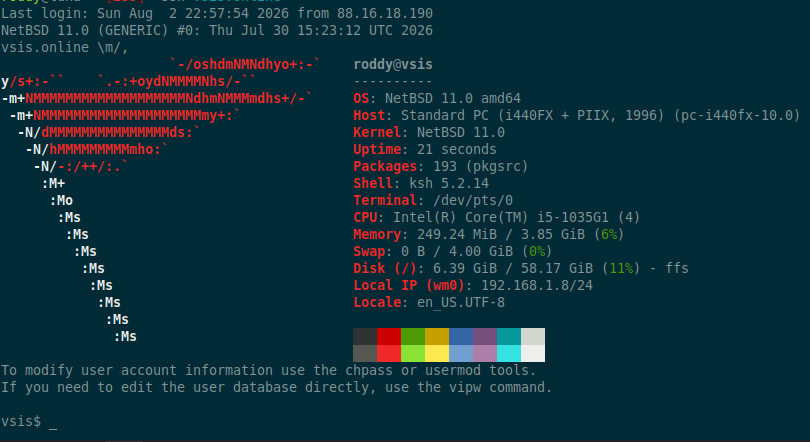
Alt...
A screenshot of a NetBSD 11.0 system.
![[?]](https://cdn.fosstodon.org/accounts/avatars/000/186/507/original/d6235003bb2d678e.jpg)

Anyone else DIY monitor the air quality in their living space with a raspberry Pi and get mobile notifications about status?
Just me?
#prometheus #airquality #RPI #pushover #SelfHosting
![TIME SENSITIVE
noW
[RESOLVED] Air Quality (PM... roci has been unhealthy for more than 5 minutes. roci
Unhealthy (150+)](https://cdn.fosstodon.org/media_attachments/files/117/022/882/545/192/460/original/1e4147db10ea8ce8.jpg "TIME SENSITIVE
noW
[RESOLVED] Air Quality (PM... roci has been unhealthy for more than 5 minutes. roci
Unhealthy (150+)")
Alt...
TIME SENSITIVE
noW
[RESOLVED] Air Quality (PM... roci has been unhealthy for more than 5 minutes. roci
Unhealthy (150+)
Thinking about a new domain+project...
Anyone have the TL;DR; on self hosted fediverse software?
Mastodon vs Snac vs Pleroma vs ?
I'm looking for something that is super low maintenance and lightweight / easy on resources but as full featured as practical within those constraints.
Something easy to tune re: post lengths and media types would be cool too. A "text first" platform is desired.
I've run Mastodon in the past and it's like fishing with nukes for this use case.
What's out there?
![[?]](https://files.mastodon.social/accounts/avatars/109/246/411/862/197/824/original/1586f1125b5f9786.jpg)
Good morning Fedi friends,
I have been feeling a rising anxiety over the state of the open web and the fediverse - after seeing efforts by politicians all over the world (in Europe too!) to introduce age verification laws for social media.
My way of coping?
Teaching people how to self-host their own Fediverse profile (using the superb #GoToSocial) via #YunoHost.
Chapter 1 in this series is available here:
"Twasn't me..."
"Well... it was teh case's fault!!!11!!!"
🤡
If you ever wanted a good reason to keep around your failed hard drives, scavenging screwed up logic boards is a good reason. Ha!
#Linux #RunBSD #SelfHosting #SelfHosted #Hardware #HDD
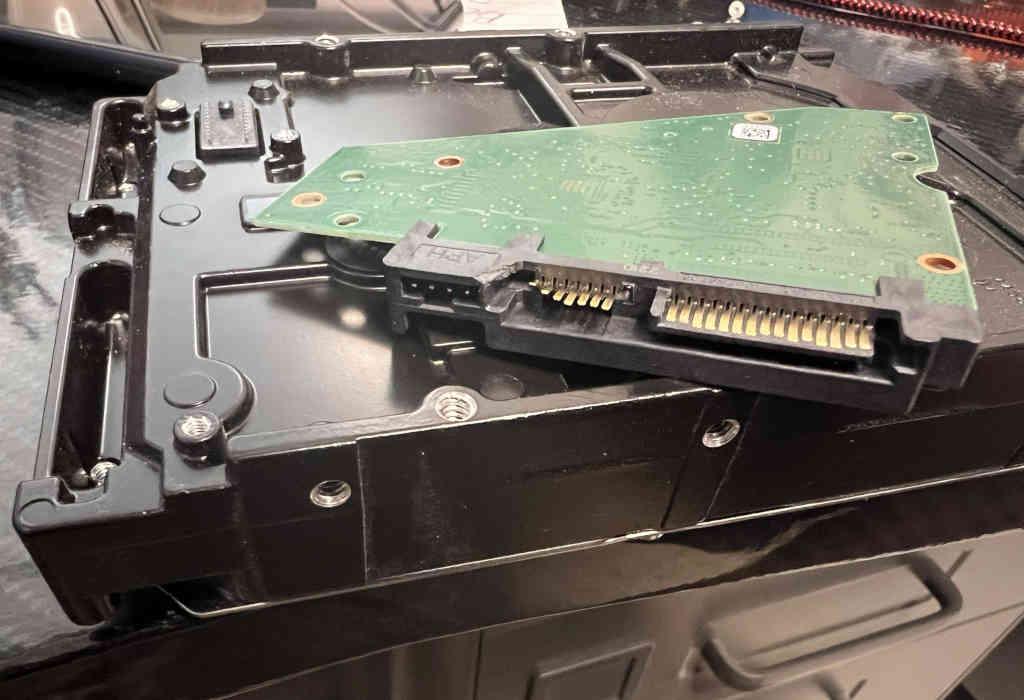
Alt...
Image of a HDD with the logic board removed and showing broken and bent interface pins.
Working on a brand new post for my series "a newbie's guide to self-hosting with #YunoHost" - showing people how to set up their own #GoToSocial microblogging instance.
Sorry it's been taking a while: I started over when I realized most people use subdomains... and I'm doing a thorough step-by-step explainer that any newbie could follow - I hope 😅
The whole series is available here:
🔗 : https://blog.elenarossini.com/a-newbies-guide-to-self-hosting-with-yunohost/
#SelfHosting #MySoCalledSudoLife #blog

Alt...
a screenshot of GoToSocial's installation page on YunoHost that reads: "GoToSocial
Current version: 0.22.0~ynh1
Potential alternative to: Akkoma, Bluesky, Calckey, Mastodon, Misskey, Pleroma, Threads, X
GoToSocial is a fast ActivityPub social network server, written in Golang.
With GoToSocial, you can keep in touch with your friends, post, read, and share images and articles. All without being tracked or advertised to!
The official documentation is at docs.gotosocial.org.
Admins are strongly encouraged to read the documentation of this package after installing it. It is available in the webadmin under Applications > gotosocial (at the bottom) or here on the package's repository!
Please note that this package uses the "i'm so tired" software license 1.0, please read it and accept it before proceeding with installation."
![[?]](https://media.bsd.cafe/bsdmmedia01/accounts/avatars/114/932/322/584/208/816/original/e8177168b64868c0.jpeg)
I've cleaned up my Raspberry Pi selfhosting setup a bit. I'm using two, each in an Argon ONE V5 case with a 1TB NVME drive, running Raspberry Pi OS.
'one' is serving Nextcloud All-in-one, Immich and Vaultwarden via a Caddy reverse-proxy. All using Docker containers, Caddy as a custom build with my domain DNS provider added.
'two' is used as remote borg backup destination for 'one', and later a few monitoring tools.
All three sites are using a wildcard certificate for my domain, and I connect via WireGuard (on the router) when away from home.
Path of least resistance:
I've tried Podman, AlmaLinux, and running a manual install of Nextcloud on Ubuntu. This setup follows recommended installations methods, and gives me fewer things to worry about.
#selfhosting #raspberrypi #nextcloud #immich #vaultwarden #caddy #wireguard
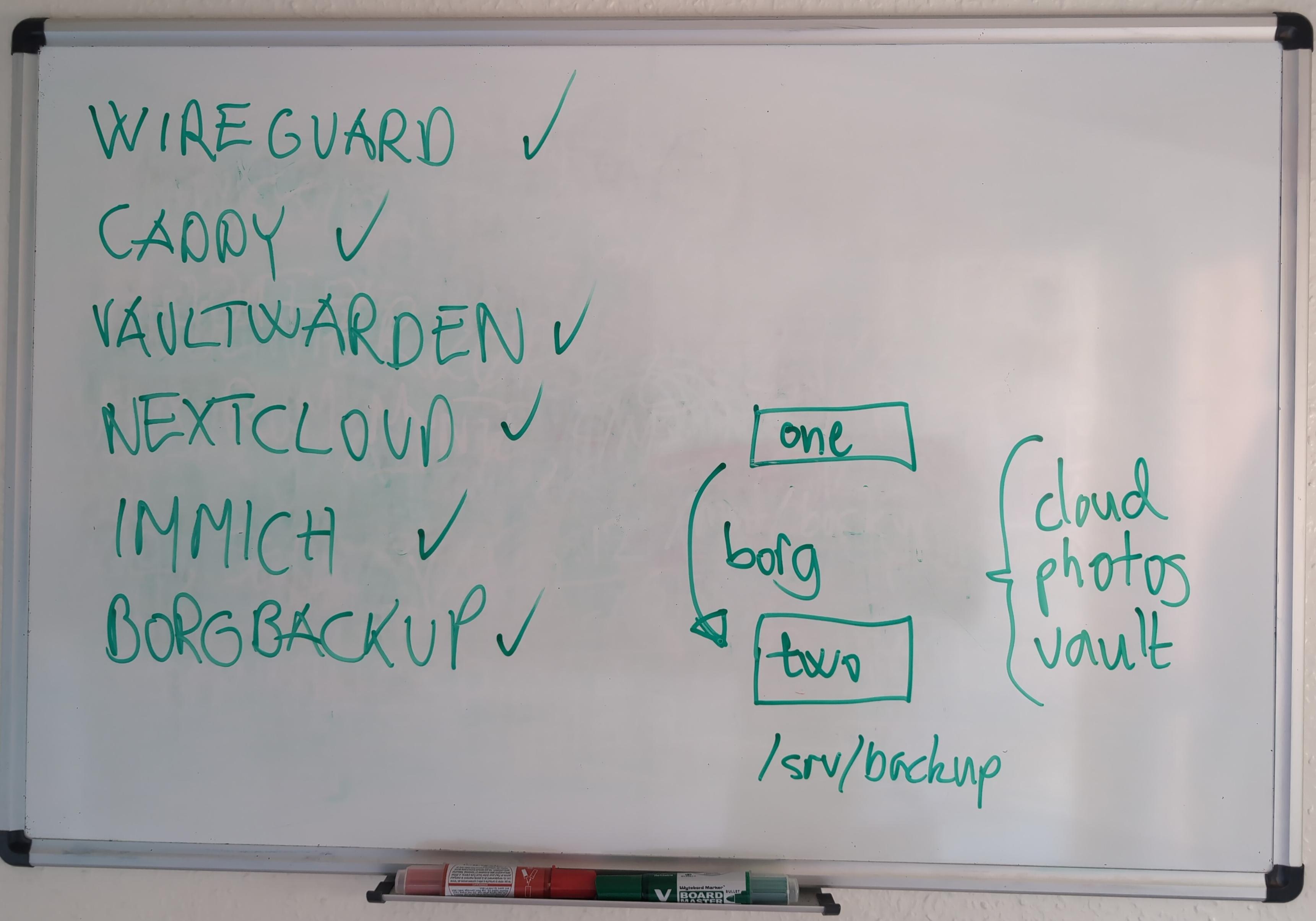
Alt...
Photo of whiteboard with green text and drawings.
Left: WireGuard, Caddy, Vaultwarden, Nextcloud, Immich and BorgBackup, each with a check mark.
Right: a simple illustration showing server 'one' and 'two' and borg backup flow.
The amazing folks at @yunohost are running a fundraising campaign to cover their operating costs for 2026.
I personally make a monthly recurring donation to them but wish I could give more 🥲
If you use their services and you can afford it, please consider donating to their project. Every Euro / Dollar / Yen counts:
🔗 : https://yunohost.org/donate.en.html
#NotAllHeroesWearCapes #SelfHosting #empowerment #resist #YunoHost
The convenience of synchronisation between devices are the most common argument that I hear from friends why they are so invested in the respective walled gardens. But the same advantages can be obtained with old well-tested and open standards. Example: get an SMS with e-mail, add it to contacts and then have it autocomplete in @thunderbird@mastodon.online connecting to whichever mail provider your heart desires, thanks to the magic of CardDAV and IMAP. No need for Giant Mail :)
My ISP was kind enough to give me a learning opportunity in how I can manage access to my homelab. While access to #selfhosting can't be in my place by definition, I can at least have it on a VPS from a local company to resist monopolies :)
I'm running Forgejo in a container now to isolate SSH access, but I also had it installed directly for some time.
This is what I use now, after #selfhosting Apache SVN, Perforce, Tuleap, RhodeCode, Phorge and Gitea so far.
Live location is very sensitive data, but #selfhosting the server with TLS and basic authentication gives me more privacy than the big tech cloud. And it only needed reading a bit of MDN and making a basic #Docker image based on #NodeJS
This time it's #Debian with #Docker. I used to avoid containers, preferring to run services directly instead. But setting up backups made me appreciate the separation between the application data in image and persistent state in mounted volumes. The final piece that convinced me is the ability to self-host my own container registry with @forgejo@floss.social
I'm doing the initial setup through #Ansible (learned from @notthebee@tilde.zone), but specific applications are managed via dockge. The ambition to do every adjustment through playbooks burns out really fast when working with a single instance.