m5l.eu is a Fediverse instance that uses the ActivityPub protocol. In other words, users at this host can communicate with people that use software like Mastodon, Pleroma, Friendica, etc. all around the world.

This server runs the snac software and there is no automatic sign-up process.

Site description
Yet another single-user instance
Admin account
@marek@m5l.eu

Search results for tag #gui

[?]Alfonso Siciliano » 🌐
@alfonsosiciliano@mastodon.bsd.cafe

Finally, I managed to install and configure a graphical environment directly during a installation session 🎉

Most of the friction was around GPU drivers, but the feedback and suggestions I received were incredibly helpful. A lot of people want to use FreeBSD on their laptops and desktops, and that really shows.

For now, the goal was to provide a simple option to install Plasma. If there’s interest and more requests, we can definitely expand this in the future with additional desktop environments and options.

Special thanks to the FreeBSD Foundation for their support 🙌

A screenshot of the FreeBSD Installer on a blue background. The main focus is the 'Final Configuration' window with a list of system configuration options. The option 'Desktop' is highlighted, indicating the choice to install a graphical environment.

Alt...A screenshot of the FreeBSD Installer on a blue background. The main focus is the 'Final Configuration' window with a list of system configuration options. The option 'Desktop' is highlighted, indicating the choice to install a graphical environment.

Text-based FreeBSD installer dialog prompting the user to install GPU drivers, Xorg, KDE Plasma, and a display manager. The message notes that this is an experimental feature. Two options, “Yes” and “No,” are shown, with “Yes” currently selected.

Alt...Text-based FreeBSD installer dialog prompting the user to install GPU drivers, Xorg, KDE Plasma, and a display manager. The message notes that this is an experimental feature. Two options, “Yes” and “No,” are shown, with “Yes” currently selected.

Text-based FreeBSD installer dialog with the title “Desktop installation completed.” The message explains that the SDDM display manager will start automatically at the next system boot and lists configured users. A tip suggests using the VBoxSVGA graphics controller and disabling 3D acceleration in VirtualBox. An “OK” button is highlighted at the bottom.

Alt...Text-based FreeBSD installer dialog with the title “Desktop installation completed.” The message explains that the SDDM display manager will start automatically at the next system boot and lists configured users. A tip suggests using the VBoxSVGA graphics controller and disabling 3D acceleration in VirtualBox. An “OK” button is highlighted at the bottom.

Screenshot of a FreeBSD 15.0 system running inside a VirtualBox virtual machine with the KDE Plasma desktop environment. In the foreground, the “About this System” settings window displays software and hardware information, including KDE Plasma version, Qt version, kernel version, and available memory. In the background, a web browser window is open on the FreeBSD official website.

Alt...Screenshot of a FreeBSD 15.0 system running inside a VirtualBox virtual machine with the KDE Plasma desktop environment. In the foreground, the “About this System” settings window displays software and hardware information, including KDE Plasma version, Qt version, kernel version, and available memory. In the background, a web browser window is open on the FreeBSD official website.

    [?]Alfonso Siciliano » 🌐
    @alfonsosiciliano@mastodon.bsd.cafe

    RE: mastodon.bsd.cafe/@alfonsosici

    Thanks everyone for all the feedback, testing, and suggestions! I'm currently fixing things up and getting a version ready for bsdinstall.

      AodeRelay boosted

      [?]Alfonso Siciliano » 🌐
      @alfonsosiciliano@mastodon.bsd.cafe

      Call for testing for a script that installs on a desktop or laptop. Testing is aimed at users who already know FreeBSD, for example who can configure /etc/rc.conf and /boot/loader.conf.
      I’m especially interested in feedback from people with NVIDIA GPUs, since I don’t have this hardware myself.

      CFT GitHub: github.com/alfonsosiciliano/kd
      CFT GitLab: gitlab.com/alfix/kde-installer
      Discussion to figure out which packages to install and which configurations to use for GPUs (for example x11/nvidia-xconfig, linux_enable="YES", and so on): lists.freebsd.org/archives/fre

      @FreeBSDFoundation

      Desk setup with a large monitor and a laptop running FreeBSD with KDE Plasma. The main screen shows KDE system information and a terminal, while the laptop displays the FreeBSD website.

      Alt...Desk setup with a large monitor and a laptop running FreeBSD with KDE Plasma. The main screen shows KDE system information and a terminal, while the laptop displays the FreeBSD website.

        0 ★ 1 ↺

        [?]Marek S. Ł. » 🌐
        @marek@m5l.eu

        Today I threw together a small in to help with experimental characterisation of hardware for . It's simply generating a sinusoidal signal within configurable limits, but now it's definitely easier to understand than running scripts in terminal.

        I did enjoy the ease of setup of TkInter, and compatibility with Matplotlib, but I was missing the simplicity of immediate mode libraries. In trying to emulate these, now a few callbacks trigger "given this dataclass with state, the widgets should look like this".
        The micro-management gremlin is whining that it's repeating useless work, but more importantly the window is complete and I can go on with the experiment.
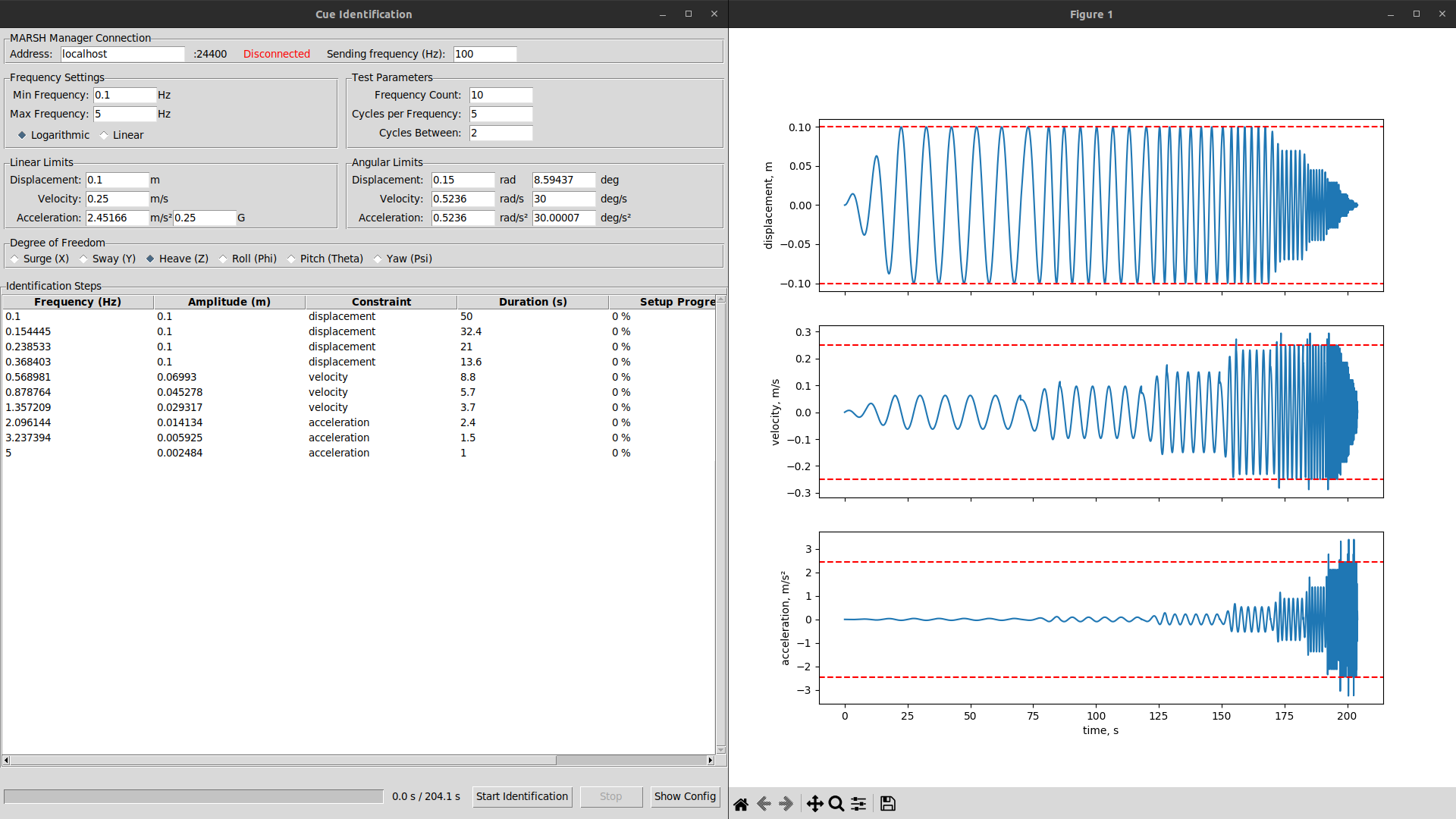
        Screenshot of a basic graphical application with settings, showing plots of generated signal to its side.

        Alt...Screenshot of a basic graphical application with settings, showing plots of generated signal to its side.